
Views: 0 Author: Site Editor Publish Time: 2026-10-20 Origin: Site


The landscape of industrial and agricultural automation is shifting rapidly. Recent industry analyses highlight a massive migration away from cloud-dependent IoT toward local edge computing in smart agriculture. In remote fields, relying on a distant cloud server to trigger a backwash cycle is risky. Cell signals drop. Latency spikes. By deploying microcontrollers directly at the pump station, engineers ensure that critical infrastructure operates flawlessly without internet dependency. Localized processing keeps your irrigation valves and pressure sensors running in real-time.
However, managing these physical systems requires uninterrupted hardware control. Traditional synchronous web servers on microcontrollers present a massive bottleneck. When a synchronous server receives a request, it blocks every other process. If multiple farm operators attempt to load the system dashboard simultaneously, the microcontroller lags. In that brief freezing window, the system might miss a crucial sensor reading or fail to shut off a high-pressure valve.
This is exactly where the ESP32 asynchronous web server proves its worth. By handling client connections in the background, the chip serves web pages while simultaneously executing its main loop. In this guide, we will explore how to use ESP32 async web server filter parameters in your C++ code. We are going to build a highly practical, real-world project. You will learn to design a smart web interface that monitors and triggers physical water filtration systems, effectively bridging the gap between digital web commands and heavy-duty mechanical actions.
To provide a clear roadmap for this technical integration, the following table outlines the core concepts and practical skills you will acquire.
| Subject Area | Key Learning Objective | Practical Application |
|---|---|---|
| Server Architecture | Understand asynchronous processing on microcontrollers. | Prevent system freezing when multiple users access the ESP32 dashboard. |
| Parameter Parsing | Learn the syntax for extracting HTTP GET/POST variables. | Read URL queries to determine specific hardware commands. |
| Hardware Integration | Bridge C++ logic with physical agricultural relays. | Control physical filtration valves via remote web requests. |
| Automation Logic | Utilize parameters to trigger sequential mechanical events. | Initiate a backwash cycle remotely without manual intervention. |
In microcontroller programming, standard synchronous web servers operate sequentially. When a client sends a request to a synchronous server, the ESP32 completely halts its main loop execution. It processes the incoming data, generates the HTML response, and transmits it back. During this blocking period, the microcontroller is blind. It cannot read analog pressure sensors. It cannot trigger safety relays. In time-sensitive agricultural automation, a delay of even a few hundred milliseconds can result in blown pipes.
An asynchronous web server elegantly resolves this issue. By utilizing the ESPAsyncWebServer library alongside the underlying AsyncTCP architecture, the ESP32 handles client connections entirely in the background. The server listens for incoming HTTP requests and processes them concurrently. As a result, your void loop() continues running at full speed. This non-blocking architecture is absolutely critical when managing time-sensitive hardware.
Parameters are specific fragments of data appended to a URL. They act as direct instructions from the client browser to your edge server. Developers commonly format these as a query string at the end of an HTTP GET request.
Consider this URL structure: http://192.168.1.100/update?filter_type=mesh&action=flush
Everything following the question mark represents the parameters. In this scenario, the ESP32 receives two distinct key-value pairs. The first tells the system the target is a mesh unit. The second dictates the action is a flush command. To build an effective IoT control panel, you must program the ESP32 to meticulously parse these incoming query strings. By extracting these variables, your internal logic dynamically determines exactly which physical component requires intervention.
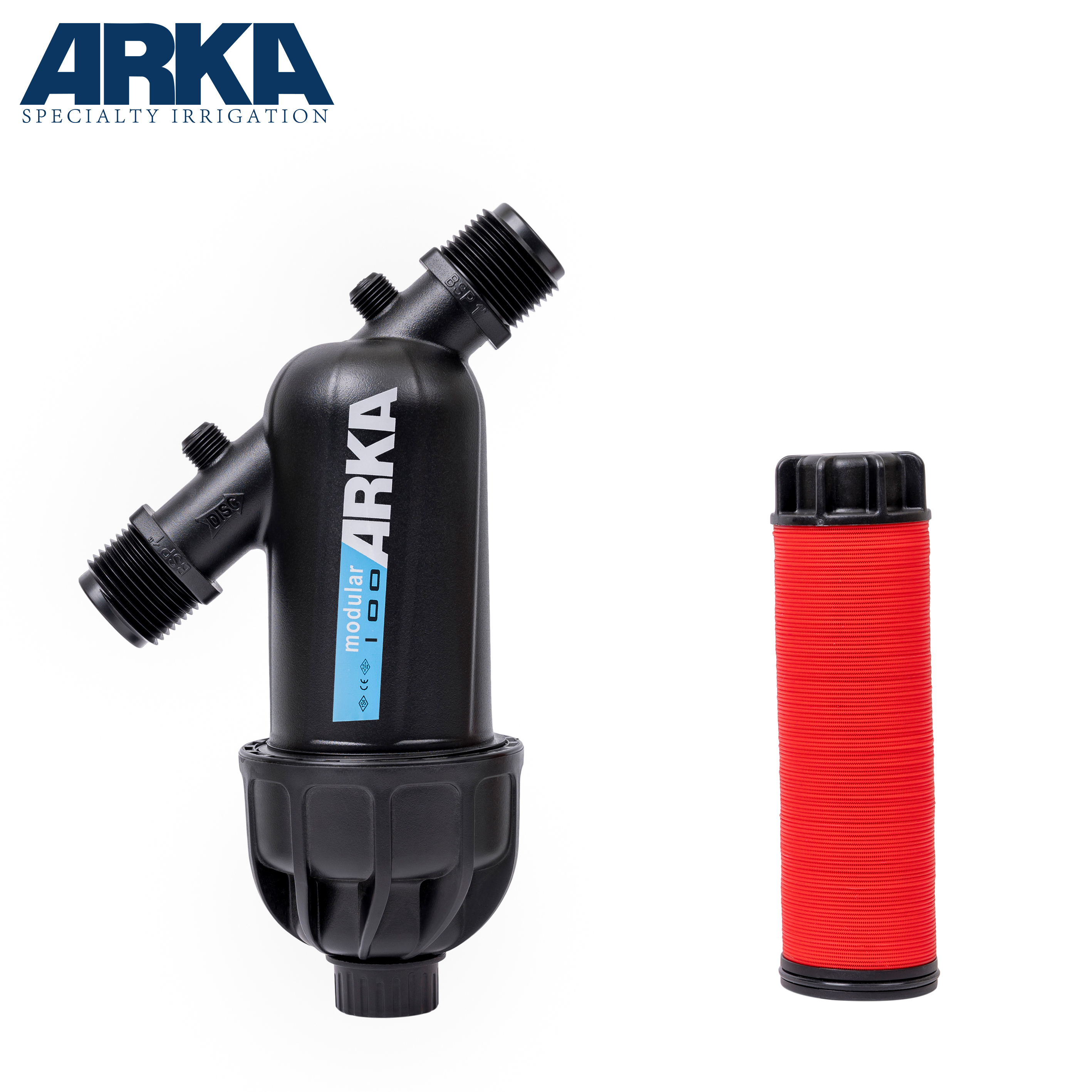
Agricultural irrigation systems rely heavily on robust water filtration. Without it, drip lines and micro-emitters quickly clog with debris from wells or open reservoirs. When building a smart controller, your software must interface directly with physical hardware. Two of the most common mechanical components I deploy in the field are the screen filter and the disc filtration unit.
Selecting the right hardware is just as critical as writing clean code. For example, a standard 3/4" Y-Type disc filter is highly effective for garden drip irrigation. These units typically offer 120 mesh or 130-micron filtration and can handle flow rates up to 5 cubic meters per hour at a maximum pressure of 8 bar. They use tightly stacked, grooved plastic rings to provide superior three-dimensional depth filtration, which easily traps organic matter like algae. In contrast, a traditional mesh unit utilizes a physical woven screen, making it better suited for inorganic sand. By connecting the ESP32 GPIO pins to opto-isolated relay modules, you can safely open and close high-voltage solenoid valves that dictate water flow through these units.
Manual maintenance of farm infrastructure is incredibly labor-intensive. Implementing an automatic filter logic significantly reduces operational downtime. In a properly configured setup, the ESP32 continuously reads data from analog differential pressure sensors installed before and after the filtration housing.
Specifically, when debris inevitably accumulates, the water pressure drops on the output side. Once this pressure differential crosses a hard-coded threshold, the ESP32 automatically triggers a cleaning cycle. However, farm operators still require remote oversight. By utilizing an async web server, the ESP32 broadcasts real-time pressure data to a dashboard. If an operator notices a persistent anomaly, they can push a button on their screen. This action sends a specific URL parameter to the ESP32 to force a manual override.
To replicate this automated control system, you need specific industrial components. Ensure all physical connections are secure. Loose wiring is the number one cause of phantom bugs in physical IoT deployments.
This project requires the Arduino IDE configured with the ESP32 board manager. Because the standard built-in WiFi libraries only support synchronous operations, you must install specific third-party libraries.
You need AsyncTCP to handle the low-level asynchronous connections. You also need ESPAsyncWebServer to provide the high-level API for routing and parsing. Download both as ZIP files from their respective GitHub repositories and install them via the Arduino IDE library manager.
The foundation of any IoT web server is a rock-solid network connection. The ESP32 must establish a link to a local router to be accessible. The following C++ boilerplate demonstrates how to initiate this connection while outputting vital debugging information to the Serial Monitor.
#include <WiFi.h>
#include <AsyncTCP.h>
#include <ESPAsyncWebServer.h>

const char* ssid = "FARM_NETWORK_24G";
const char* password = "SECURE_PASSWORD";

void setup() {
  Serial.begin(115200);

  WiFi.mode(WIFI_STA);
  WiFi.begin(ssid, password);

  Serial.print("Connecting to Field WiFi");

  while (WiFi.status() != WL_CONNECTED) {
    delay(500);
    Serial.print(".");
  }

  Serial.println("\nConnected successfully!");
  Serial.print("Access Dashboard at IP: ");
  Serial.println(WiFi.localIP());
}

void loop() {
  // Main loop remains entirely free for sensor polling
}Once the network handshake completes, the next step is instantiating the server object and defining its routing behavior. Port 80 is the standard default for HTTP traffic.
AsyncWebServer server(80);

void setup() {
  // ... (WiFi connection code) ...

  server.on("/", HTTP_GET, [](AsyncWebServerRequest *request){
    request->send(200, "text/plain", "Irrigation Control Server is Active.");
  });

  server.begin();
  Serial.println("Async Server running.");
}Understanding basic routing is merely the starting line. Mastering parameter extraction allows you to execute precise hardware commands dynamically. The ESPAsyncWebServer library provides built-in methods to inspect incoming requests. Before attempting to read a value, your code must verify if the expected parameter actually exists. Failing to do so results in a null-pointer exception, which instantly crashes the ESP32.
Imagine a farm manager needs to check the pressure status of a specific zone. They tap a button that sends a request to http://[IP]/status?type=disc. The following logic intercepts this URL, filters the request based on the parameter, and returns the physical data.
server.on("/status", HTTP_GET, [](AsyncWebServerRequest *request){
  String responseMessage;

  // Always verify the parameter exists before reading
  if (request->hasParam("type")) {
    String filterType = request->getParam("type")->value();

    if (filterType == "disc") {
      responseMessage = "Status: CLEAN. Pressure Drop: 0.2 Bar.";
    }
    else if (filterType == "screen") {
      responseMessage = "Status: WARNING. Pressure Drop: 0.8 Bar.";
    }
    else {
      responseMessage = "Error: Unknown hardware specified.";
    }
  }
  else {
    responseMessage = "Error: Missing 'type' parameter.";
  }

  request->send(200, "text/plain", responseMessage);
});Monitoring is passive, but triggering mechanical action is active. To initiate a physical process, we pass multiple parameters using the ampersand symbol. If an operator wants to manually force a self cleaning filter to backwash, the URL looks like /control?action=clean&target=zone1.
const int RELAY_PIN = 26;

void setup() {
  pinMode(RELAY_PIN, OUTPUT);
  digitalWrite(RELAY_PIN, LOW); // Valve closed by default

  // ... (Server setup) ...

  server.on("/control", HTTP_POST, [](AsyncWebServerRequest *request){
    // The 'true' argument tells the server to look for POST parameters
    if (request->hasParam("action", true) && request->hasParam("target", true)) {

      String actionVal = request->getParam("action", true)->value();
      String targetVal = request->getParam("target", true)->value();

      if (actionVal == "clean" && targetVal == "zone1") {
        digitalWrite(RELAY_PIN, HIGH); // Open the flush valve
        request->send(200, "text/plain", "Backwash sequence initiated.");
      } else {
        request->send(400, "text/plain", "Invalid command.");
      }
    } else {
      request->send(400, "text/plain", "Missing parameters.");
    }
  });
}
By structuring your code this way, you ensure that high-voltage relays only trigger when exact, validated conditions are met via the web interface.
A resilient C++ backend requires an intuitive frontend. The ESP32 serves HTML, CSS, and JavaScript directly to any browser on the local network. When designing the dashboard for agricultural use, clarity is paramount. Field workers need to see system statuses at a glance, often under harsh sunlight on small smartphone screens.
Furthermore, utilizing a lightweight CSS Flexbox layout ensures the interface remains mobile-responsive. Your dashboard should feature distinct UI cards for different irrigation zones. Using the JavaScript fetch() API, you bind your HTML buttons to the endpoints we created earlier. This allows the web page to send parameters to the ESP32 asynchronously, triggering valves without ever forcing the user browser to refresh.
Storing massive HTML strings directly inside your main file is a poor engineering practice. It clutters your logic and consumes valuable dynamic memory. For professional deployments, you should utilize the ESP32 onboard flash memory.
By implementing SPIFFS or LittleFS, you partition a segment of the flash memory to act as a miniature hard drive. You upload your separate HTML and CSS files directly to the board. The async server then serves these files with a single, elegant line of code.
Deploying microcontrollers in harsh physical environments introduces unique software challenges. One frequent cause of system crashes is attempting to manipulate a parameter that the client failed to send. If a user manually types a URL and omits the query string, executing the value extraction without a prior hasParam() check guarantees a fatal exception.
Always wrap your variable extractions in strict conditional statements. Implement rigorous validation for the parameter values themselves. If your system expects the string "start" but receives "pump", your code must gracefully reject the request with an HTTP 400 Bad Request status.
Farms are notorious for spotty WiFi coverage. If the ESP32 drops its connection, the asynchronous server becomes stranded. To mitigate this, write a non-blocking auto-reconnect function within your main loop. Utilize millis() to periodically check the connection status and attempt reconnection without using the dreaded delay() function.
Additionally, beware of heap memory fragmentation. Continuously concatenating the Arduino String class when parsing long HTTP parameters eventually fragments your RAM. This leads to unpredictable reboots. Where possible, reserve string memory in advance or transition to standard C-style character arrays for long-term stability.
By default, the ESP32 transmits data in plain text. Exposing this server directly to the public internet via port forwarding is highly dangerous. Malicious actors could easily intercept your parameters and manipulate your irrigation valves, potentially flooding crops or burning out expensive pumps.
For secure deployments, connect the ESP32 to a local network accessible only via a secure VPN. Alternatively, implement HTTP Basic Authentication. This feature is natively supported by the async library, allowing you to lock specific endpoints behind a username and password before the code ever attempts to parse the parameters.
As your agricultural operation expands, you may find yourself managing dozens of filtration stations. Writing individual, hard-coded routes for every single zone is highly inefficient. Instead, optimize your C++ code by utilizing arrays and structs.
You can pass an ID parameter alongside your action command. Your code extracts the ID, converts it to an integer, and uses it as an index to access an array of defined relay pins. This dynamic approach allows a single, concise block of code to control a virtually infinite number of physical hardware zones.
Mastering parameter parsing on an ESP32 async web server fundamentally elevates your approach to smart irrigation automation. By transitioning away from blocking synchronous servers, you ensure your microcontroller efficiently manages complex mechanical tasks—like monitoring pressure differentials and triggering heavy-duty valves—without missing a beat.
Implementing strict validation techniques, memory management strategies, and proper hardware integration allows you to build a highly resilient agricultural network. Ready to upgrade your farm infrastructure? Whether you need a simple mesh screen setup or a high-capacity 3/4" Y-Type unit, selecting the right physical hardware is just as important as your code. Explore professional-grade solutions at ARKA Irrigation to find the perfect filtration system for your next IoT automation project, reduce manual maintenance labor, and take absolute digital control over your water management.
The standard WiFiServer library operates synchronously. It completely halts the execution of your main loop while waiting for a client to connect, transmit data, and receive a response. In agricultural automation, your microcontroller must continuously poll sensors and monitor safety timers. An asynchronous server handles all web traffic in the background, ensuring critical hardware actions are never delayed by a slow web page load.
Absolutely. You chain multiple parameters together utilizing the ampersand symbol. For instance, a request formatted as ?target=zone2&action=clean&duration=60 sends three distinct pieces of data. The async library parses this seamlessly, allowing you to extract all three values within the same request handler to execute complex multi-variable hardware sequences.
Because the ESPAsyncWebServer is built on top of AsyncTCP, it manages multiple client connections concurrently in the background. Instead of forcing clients to wait in a single-file line, the ESP32 allocates memory for each incoming connection and processes the headers as they arrive. This means multiple farm operators can view the dashboard at the exact same time without crashing the server.
Physically, a screen mesh unit uses a woven barrier to block larger particulates, making it suitable for sandy well water. A disc unit utilizes a stack of tightly compressed, grooved rings to trap organic matter, providing superior depth filtration. Programmatically, the ESP32 logic remains identical. You simply adjust your URL parameters to activate the specific relay channels connected to their respective cleaning valves.
When you use request->getParam("name")->value(), the async library returns a String object by default. To use this data for timers or math logic, you must convert it. You can easily do this by appending the toInt() method, like so: int duration = request->getParam("time")->value().toInt();. Always ensure you validate the parameter exists before attempting the conversion.
If your HTML, CSS, and JavaScript files exceed a few dozen lines, embedding them as raw strings in your C++ code becomes unmanageable and drains dynamic memory. The industry best practice is to use LittleFS or SPIFFS. These file systems partition a section of the ESP32 onboard flash memory, allowing you to upload your web files directly and serve them statically, keeping your logic clean and your RAM free.


